AI Module (AI²)
An AI-native interface to the Operator Platform.
The AI Module, also called AI², exposes the platform's Northbound Interface (NBI) capabilities to AI agents through natural-language interaction. It supports workflows that combine multiple CAMARA API operations, such as registering applications, creating application instances and discovering edge cloud zones. It consists of two components:
- MCP Module: exposes CAMARA API operations as callable Model Context Protocol (MCP) tools and forwards requests to Open Exposure Gateway (OEG).
- AI Agent: interprets natural-language requests using a Groq-hosted language model and coordinates execution through the MCP Module.
With authentication enabled, requests use the caller's bearer token, with OEG enforcing access permissions.
What it does
- Translate natural-language requests into tool calls and combine multiple operations in one workflow, such as registering an application, selecting a zone and creating an instance.
- Expose 20 explicitly registered MCP tools covering Edge Application Management, Quality on Demand, Traffic Influence and Location Retrieval.
- Provide a Portal chat backend through
POST /groq-mcp, with a separate streaming endpoint atGET /groq-mcp/stream; compatible external MCP clients can also use the MCP server directly. - Keep a configurable window of recent conversation turns in optional Redis session memory; without Redis configuration, requests are stateless.
Request flow
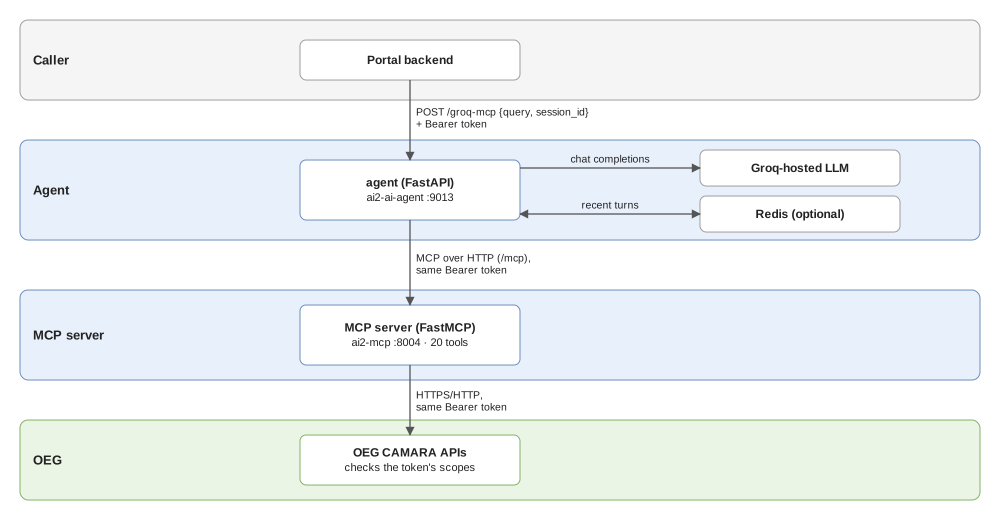
- The Portal sends the user's message and
session_idto its backend atPOST /api/ai2/chat. The backend forwards the request and the user's access token to the AI Agent atPOST /groq-mcp. - The agent adds recent conversation turns from Redis when session memory is enabled and a
session_idis supplied, then uses the configured Groq-hosted model to select MCP tools and their arguments. - The agent invokes tools on the MCP server over HTTP, using the same bearer token. Each tool builds a request to the corresponding OEG API.
- OEG checks authorization and handles the request through the platform's services. Tool results return to the agent, which produces a response for the user and stores the completed conversation turn when session memory is enabled and a
session_idis supplied.
Read in the specs
| Question | Where to read |
|---|---|
| What is AI², who can use it, and where are its boundaries? | Overview & Architecture |
| How do chat, tool calls, session memory and security work? | Requirements & Design |
| What are the chat payloads, MCP tools and input rules? | Interface Contract |
| How is AI² configured, deployed, tested and extended? | Implementation & Delivery |
Code and deployment
| Item | Details |
|---|---|
| Repository | ai2, containing ai_agent/, mcp_module/, deployment/ and tests/ |
| AI Agent | FastAPI; entry point ai_agent.app:app; default port 9013; service ai2-ai-agent |
| MCP Module | FastMCP on FastAPI; entry point mcp_module.app:app; default port 8004; service ai2-mcp; configured MCP URL ends in /mcp |
| Helm | Platform umbrella chart → subchart ai2; separate agent and MCP deployments, with optional Redis; component image tags default to 2.0.0 |
| Dependencies | OEG, a Groq API key and network access to Groq; Redis for session memory; the caller's Keycloak access token when authentication is enabled |
| Configuration | Agent: MCP_SERVER_URL, GROQ_API_KEY, GROQ_MODEL_NAME; MCP: OEG_SERVICE_URL; memory: REDIS_URL, MEMORY_WINDOW_TURNS, MEMORY_TTL_SECONDS |
| Health checks | Both components expose GET /health to confirm that the processes are running; these checks do not verify connectivity to Groq, Redis or OEG |